

Welcome back to Term 4 and already almost a week down.
As requested, and promised, here is the presentation and ICT progressions themselves from ULearn 2012 in Auckland last week.
Apologies that some fonts didn't translate to internet as well as when presenting so I've replaced them with some more boring fonts. Stupid boring fonts. There really just isn't an excuse for them.
As for the video links, do follow them. In particular, I think ALL intermediate aged girls (and boys!) should be shown the Dove Evolution advert from the presentation. Unfortunately the version I used had the embedding option turned off but go here to check it out for yourself.
Video links:
Did You Know?
Dove Evolution - No wonder our perception of beauty is distorted.
Can I be your friend? - What Facebook looks like in real life.
Here are the progressions themselves;
TBCS ICT Progressions 2012
These are a living document which we are ever updating. If you use these as a base for your own progressions, I encourage you modify and adapt them to your situation. Converse with the teachers in your school, and feeder schools, and with your community, to work out what you want your kids to know and learn about. Progressions have to work for you and your situation or they become another bit of paper gathering dust in the corner.
In terms of assessing. I spoke about these not being a tick list but a check point. I keep in mind where my kids should be at in the sequential rubric and assess anecdotally. If I notice a gap, I record and respond. With the Solo Taxonomy, I choose one or two areas which fit with my unit of teaching and focus on those. I would assess those areas but again, mostly, this would be assessed anecdotally.
I try to get an even coverage but it has to address the needs of my kids and the context in which they are learning these skills. I don't teach ICT as a subject, though I may teach an ICT focused lesson within the context of my unit.
For example, today in reading we learnt about research and the importance of checking your facts in multiple locations.
I used www.allaboutexplorers.com, a fabulous spoof website about real explorers, to show kids that they can't just believe everything they read. My focus was reading comprehension - finding information, making connections, thinking critically, and questioning - and alongside that, we were learning about "Research (reliability and accuracy)"
The key thing is to make it useful, functional and manageable for you... and above all, make ICT fun for the kids!
Hope you find all this useful. :)

Thursday, October 18, 2012

Monday, October 8, 2012
ULearn 2012, Here We Come.
Wow, I can't believe the time has come already. I know I've been neglecting the blogoshpere, sorry for that. Things have been a little crazy round here.
It's been another busy term for everyone and, for me and 1500 odd others, ULearn conference has been looming ever closer.
You may remember that my darling principal had the bright idea that I should offer to present and with the carrot of attend ULearn and wide eye naivety thinking I wouldn't get chosen, I managed to drop myself right in it as usual.
Anyone who knows me, knows that this presentation has not been far from my mind for most of the year. It may seem small to some but the thought of presenting to a classroom of intelligent peers scares me rather more than a classroom of children. However, I'm also looking forward to sharing our school's journey and the knowledge I've gleaned along the way.
I've picked a topic that has also never been too far from my mind this year as we move ICT forward in our school. For the past 2 or so years, at TBCS we have been debating the need for ICT progressions. Should we have them at all? If so, what should the cover? What shouldn't they cover?
So enters... "The Art of Progression". Because it really is more of an art than a science.
Stay tuned for the presentation, cliff notes edition, here in the near future.
Meanwhile, preparing for this has reminded me of something I wanted to share with you all. I wanted to encourage you all to step outside your comfort zones and learn something new.
It's in presenting to peers that I feel what my students are feeling when they do their speeches. In fact, when I shared with them that I was presenting at ULearn, they felt much happier about attempting it themselves. They could see that;
1) There was a real context for this. They didn't have to become a politician or TV personality for it to have relevance in their future careers.
and;
2) I wasn't asking them to do something I wasn't prepared to do myself. We've all heard the saying "Thems who can't do, teach." The fact may be, that it's totally false, (I'd like to see some of those who think they CAN do, teach!) But kids today have often heard that saying and believed it so it's important for them to see us "doing" as well as "teaching".
I find things like learning a language or reading my bible, help me to understand what it's like for them as they learn to read. I'm using all the strategies I want them to use, to help me to understand what I'm reading.
On occasion, I've photocopied a page with a word I don't know the meaning of and worked through the process of guessing and checking, with them. Doing it with a word I don't know shows them that I use the skills too. I'm not just being difficult and refusing to telling the the answer, which in their minds, and rightly so, would be so much simpler.
Awhile ago, at a teacher only day, our cluster turned the tables on ourselves. We had students come in and teach us things they were good at. Ripsticking, dancing, ICT programs, iPod games and the like. The kids loved being the experts and the teachers got a taste of their own medicine. I actually think that was a great thing to do. It gave the kids a peek into the struggles of teaching and teachers an insight into the world of their learners.
Now, I know I'm a learner strength. I love learning new things but even so, the challenge is to be aware of what it feels like when I'm learning and what I do to learn. For someone who doesn't have the learner strength, the value would probably be even be greater as you would see it from your struggling learner's perspective. I'm guessing though, most teachers probably do enjoy learning to some extent, so the challenge for you, is to take on something tough. Learn something that doesn't come naturally. Go to a Bunnings Warehouse workshop night, try out a craft, take a night class in something. Even a one night only class would be fine. Anything that would get you out of your comfort zone and learning some thing new. Then take a moment to notice how you are feeling, what strategies you are using to learn and what coping mechanisms and/or emotions come into play. Then you can remember back to your own experiences the next time you are struggling to get the point across and it might just help. And don't be afraid to share your experiences with your students. They love hearing about your life beyond the classroom walls. It makes you seem more human.
It's been another busy term for everyone and, for me and 1500 odd others, ULearn conference has been looming ever closer.
You may remember that my darling principal had the bright idea that I should offer to present and with the carrot of attend ULearn and wide eye naivety thinking I wouldn't get chosen, I managed to drop myself right in it as usual.
Anyone who knows me, knows that this presentation has not been far from my mind for most of the year. It may seem small to some but the thought of presenting to a classroom of intelligent peers scares me rather more than a classroom of children. However, I'm also looking forward to sharing our school's journey and the knowledge I've gleaned along the way.
I've picked a topic that has also never been too far from my mind this year as we move ICT forward in our school. For the past 2 or so years, at TBCS we have been debating the need for ICT progressions. Should we have them at all? If so, what should the cover? What shouldn't they cover?
So enters... "The Art of Progression". Because it really is more of an art than a science.
Stay tuned for the presentation, cliff notes edition, here in the near future.
Meanwhile, preparing for this has reminded me of something I wanted to share with you all. I wanted to encourage you all to step outside your comfort zones and learn something new.
It's in presenting to peers that I feel what my students are feeling when they do their speeches. In fact, when I shared with them that I was presenting at ULearn, they felt much happier about attempting it themselves. They could see that;
1) There was a real context for this. They didn't have to become a politician or TV personality for it to have relevance in their future careers.
and;
2) I wasn't asking them to do something I wasn't prepared to do myself. We've all heard the saying "Thems who can't do, teach." The fact may be, that it's totally false, (I'd like to see some of those who think they CAN do, teach!) But kids today have often heard that saying and believed it so it's important for them to see us "doing" as well as "teaching".
I find things like learning a language or reading my bible, help me to understand what it's like for them as they learn to read. I'm using all the strategies I want them to use, to help me to understand what I'm reading.
On occasion, I've photocopied a page with a word I don't know the meaning of and worked through the process of guessing and checking, with them. Doing it with a word I don't know shows them that I use the skills too. I'm not just being difficult and refusing to telling the the answer, which in their minds, and rightly so, would be so much simpler.
Awhile ago, at a teacher only day, our cluster turned the tables on ourselves. We had students come in and teach us things they were good at. Ripsticking, dancing, ICT programs, iPod games and the like. The kids loved being the experts and the teachers got a taste of their own medicine. I actually think that was a great thing to do. It gave the kids a peek into the struggles of teaching and teachers an insight into the world of their learners.
Now, I know I'm a learner strength. I love learning new things but even so, the challenge is to be aware of what it feels like when I'm learning and what I do to learn. For someone who doesn't have the learner strength, the value would probably be even be greater as you would see it from your struggling learner's perspective. I'm guessing though, most teachers probably do enjoy learning to some extent, so the challenge for you, is to take on something tough. Learn something that doesn't come naturally. Go to a Bunnings Warehouse workshop night, try out a craft, take a night class in something. Even a one night only class would be fine. Anything that would get you out of your comfort zone and learning some thing new. Then take a moment to notice how you are feeling, what strategies you are using to learn and what coping mechanisms and/or emotions come into play. Then you can remember back to your own experiences the next time you are struggling to get the point across and it might just help. And don't be afraid to share your experiences with your students. They love hearing about your life beyond the classroom walls. It makes you seem more human.
Happy Learning...
ULearn 2012, HERE WE COME!!!
Thursday, August 9, 2012
Popplet Update
Room 3's Popplet - Purity in our World
My last post was about Popplet and here is my class's first attempt..jpg)
We really enjoyed bringing this work together. It was great that we were able to collaborate on it.
We discussed the concept in class with some visual demonstrations and verbal brainstorming and then the children went away to brainstorm their ideas on the Popplet I'd set up for them.
From their first effort, I was able to see who understood the concept and who had slightly warped understandings. We were able to discuss and edit as a class and then the children had a second independent/collaborative brainstorm. We finished with another a whole class review and edit. It was great to hear the kids debating and justifying their ideas and explaining their concepts to allow them to stay on the shared work. Love it.
Handy Hint 1;
In the settings menu, under "labs" you will find "popplet permissions". There are two settings;
When your kids are working, make sure the top option (which is default) is chosen. This means the kids can only edit the boxes they created and they are less likely to delete or change each other's work. Unfortunately the Popplet creator (you the teacher) is subject to this too.
So, when you want to edit as a class, change to the second option. Remember ALL collaborators can now edit anyone's boxes so it's wise to move the kids away from their computers/ipads before changing this setting. I use this permission setting when I have the Popplet on the projector and the class on the mat.
Handy Hint 2:
When you name your student accounts, choose your names carefully as they can't be changed later. If you want to take advantage of the Popplet labels which show which user is editing each Popplet box, then you need to give your accounts identifying names. I called all my accounts Tas Bay because the accounts are generic and not assigned to particular students. This means my children have to name their boxes. How you manage that is dependent on how you manage your students' online accounts and email address access.
Overall Review: A Cool Tool
- I found Popplet to be functional and useful.
- I liked the cross platform internet/iPad capabilities.
- There were some issues around computers which didn't auto refresh (iPad possibly suffers this problem) but this is common to google docs and other collaborative tools.
- Some of the editing and personalization tools were a bit clunky and limited but I expect this tool will grow and improve as we use it. Future versions of the tool my address these complaints but they currently don't affect the usefulness of the tool as a whole.
- Most importantly, for me, It created great conversations as the children debated the ideas as they were put up. Even more great conversations happened as we reviewed the work as a class.
- As a teacher, I was able to see who understood the concept and who needed more support and I was able to address that immediately.
- Ultimately, I can see lots of uses for this tool.

Friday, July 6, 2012
Popplet Collaborative Online Mindmapping
One of the many Apps I've learnt about at the recent Slide2Learn conference in Melbourne, was the Popplet App.The great thing about this App is that it's also a website accessible by non-apple technology.
What is Popplet and what can it do?
Popplet is simple to use mind mapping software that allows you to create follow charts and brainstorms collaboratively online.
 Popplets can include text, drawing and images which makes it a great collaborative tool which can be used in so many different ways.
You can share your Popplets with selected people and work on them together in real time (at the same time.)
Popplet shows who created each box which allows for greater idea ownership and accountability.
There are various options to edit and customize your Popplet mind map.
Each Popplet box can be connected or float separately allowing your students to create their own smaller mind maps within a larger Popplet. You can zoom in an out to work on different sections. This means that your mind map can grow to be quite large and still be fully functional. You will need to consider size in terms of how you ultimately share or use your Popplet though. For example, if you intend to print it, you wont want it to get so big that the boxes and text are too tiny to be seen clearly once printed.
How do you setup Popplet?
Each user needs to have an account and that requires an email address. I already have gmail accounts setup for my students. They use these for google docs and other programs. I have them locked down pretty tight and incoming emails divert to my own gmail account.
Rather than signing up each student account individually, I signed myself up, created my first Popplet and then invited each of the accounts. In doing so, the Popplet webpage asks for their email address and name (make sure you put the name in correctly because you can't change this afterwards and neither, it would seem, can they). Popplet then creates their account and emails them the password. For my gmail setup, I got these emails and then logged in for the first time.
 When you (or they) login for the first time, you want to go to the account tab in the top right corner and reset the password to your preferred password. To reduce passwords I have a generic password for all the student accounts as these are not individually owned by the kids but rather shared. I hand out little cards at the start of a lesson and that is the account they will use for that day. The following lesson they may have a different account. This discourages them from using these email addresses to set up personal things or send personal emails.
Important - You also want to change the activity settings to "none" on your student accounts or, if their accounts divert to your own email, you'll receive multiple copies of each Popplet newsletter or other announcement.
Each time you create a new Popplet, you need to go to the share option, at the top right of the Popplet, and invite the relevant students/accounts. They can then see the new Popplet in their list on the main login screen and you can collaborate away.
What then?
Once you've finished your Popplet, you can export it to twitter, Facebook, PDF, JPEG (picture file), you can link to it, or share it publicly with a URL. That gives you heaps of ways to get the kids learning out there. You (and they) will be able to share it on a blog, save it to their online portfolios, email to someone or print it and stick it on the wall.
So....
One guess what my kids will be doing first week back! I'll keep you posted as to the results.
Till then, Happy Poppleting.
Wednesday, June 27, 2012
The Ultimate iGeek's Guide to Managing, Prioritizing and Completing [dream on!] Your To-Do-List
This year I've stepped into new realms of professional challenge and found the workload more than a little overwhelming at times. You've probably noticed my long absences from the blogisphere and it's not that I don't have anything to say (I am still me after all), I just haven't had any time to say it!
This blog post will take you on a whirlwind tour of my last 6-8 months in mastering the fine art of to-do-lists.
Bare with me as I travel through a variety of ways that have worked for others, but didn't really work for me, and then let me share with you, the ultimate iGeek's tool for maintaining, managing, prioritizing and completing [dream on!] your to-do-list.
But first... the journey so far...
When it comes to being organised. I seem to be in a constant state of organizing and yet never quite feel actually organised! This year one of my chosen appraisal goals was to manage my stress levels and find ways to work smarter not longer. It was particularly important as I took on some larger projects and responsibilities this year.
To achieve my goal, we talked about keeping a to-do-list and prioritizing what needed to be done. Thus began my experimentation with management strategies
Version 1: Mac's Dashboard Sticky Notes:
At first I tried keeping post-it notes on my Mac "dashboard" (for the PC users in our midst, the mac dashboard is sort of like a hidden desktop which holds sticky notes and other widgets as in the picture to the left).
Positively dashboard sticky notes didn't get lost like random bits of paper would but they did tend to multiply and not get finished or cleared and as completion was shown by deleting them, there was no record of what was achieved to give you the warm fuzzy "I actually achieved something today" buzz at the end of the day.
I also found them far too easy to ignore as I had to deliberately go and look at them. I also found that I ended up with multiple post-its because I could only have a limited amount of text on each one.
There was also no way to prioritize things so I just ended up dealing with a lot of stuff as it arose and what went on the sticky notes tended to get forgotten and ignored among the many other bits of information, html code, contact details and even recipies which also ends up on sticky notes on my dashboard.
Ultimately, Sticky Notes work great for me to store bits of random data but, as a to-do-list, it didn't work for me.
Version 2: The Exercise Book:
The positives of this method, was that there was unlimited space for a growing to-do-list, I could see what I'd already achieved and it looked really cute (I covered it in Pooh Bear duraseal). This worked for awhile.
An annoying factor was that it wasn't so portable so it wasn't always there when I needed to add a new task and meant some tasks where still kept in my head. This had meant it didn't help my stress levels as I was always trying to remember what I had to do. I often ended up feeling like there was heaps to do and it all became a bit too daunting. I also risked forgetting stuff and I couldn't see how much I'd achieved because many of the tasks from the day had never made it into the book. Plus, again, it wasn't visual enough for me. I wanted it right under my nose so I knew what I had to do and could keep track of my progress and not forget important jobs.
Version 3: The Bedroom Wall of Work:
 This was getting better. It was visual and hard to miss. I still have these on my wall. A3 printouts of annual plan pages within my responsibility areas and laminated A3 paper "whiteboards" full of my to do lists in various areas.
These are easy to monitor and have the satisfaction factor when marking things off. (Look at all the ticks Mum!)
It's great for ensuring you don't drop the ball by forgetting something big and important.
The downside is that it works better for the big and longer term stuff. It's not portable at all and it's not so useful for the little everyday tasks which generally don't even make it to the wall. This means you don't always have a true picture of just how much you really need to do, in which case, I tend to imagine having more mega stuff to do than I actually do and thus, again, I find myself suffering from elevated stress levels.
Having said that, as part of the picture of what works for me, this does help.
Although, for those of you with husbands and partners, I'm not sure how well will go down if you filled their inner sanctum with all your work to-do-lists. I know my colleague/flatmate was also horrified that I had school work on my bedroom walls and my boss will probably hit me when she reads this post.
But wait!.....
Here entereth "The iGeeks Ultimate To-Do-List Solution!"
Priority Matrix - Cloud Sync:

 Priority Matrix (available on iTunes App Store) has been the right answer for me.
I had a previous free version on my iPhone and used that with some success but they have now created a cross platform version which syncs via an account on their network. I can now have my to-do-list on my iPhone, iPad and Mac.
So far I haven't felt the need to buy the Mac platform but it's good to know the option is there if I choose to use it in the future.
Each platform is sold separately and, at approximately NZ$8 per platform, it could be considered expensive in terms of Apps, but I've found their improved functionality and portability to be worth the cost.
I always have my phone with me so I can add a task on the fly and I can use the increased capabilities of the iPad App to manage my to-do-list more conveniently the rest of the time.
I've also found it to be highly customizable right down to the colour schemes.
.PNG)
The top benefits I've found are;
1. I can have multiple task lists to keep my church, work and life responsibilities separate and well managed. I also have separate matrices for my key responsibility areas. This makes the to do lists more manageable and less daunting and as I can get into my ICT head space and just the related tasks to that area or if I'm in my life head space, I can see and manage those tasks.
.PNG) 2. I can put dates to activities and they show a little countdown on their icons (I can choose an icon for each task to give a visual reminder of what that task is). The App can pull up a list of tasks which are overdue, due today, or due within the week. Great for seeing at a glance what is actually needing to be done and when.
2. I can put dates to activities and they show a little countdown on their icons (I can choose an icon for each task to give a visual reminder of what that task is). The App can pull up a list of tasks which are overdue, due today, or due within the week. Great for seeing at a glance what is actually needing to be done and when.
3. I can sort tasks into different quadrants; "critical and immediate", "critical but not immediate", "not critical but immediate" and uncategorized. I can change the quadrant titles too. The App can then produce a list of tasks in each quadrant (across all my different matrices).
.PNG)
4. I can drag the cross bars in the centre of the matrix to one side or another so I can focus more (or entirely) on one particular quadrant. That's great for my Blog to-do-list as this is more a place to record post ideas rather than a to-do-list as such. So I don't need to see the other 3 quadrants for this matrix.
What I really love is that the App remembers my cross hair positioning from one visit to the next AND from one platform to the next. For example, I positioned the cross hairs on the iPad, then viewed another matrix on the same platform and later accessed Priority Matrix on my phone. It sync'd on arrival, as usual, and not only did it remember the positioning of the cross hairs but it also took me directly to the matrix I'd viewed last on the iPad, even though it was different from the matrix I'd last viewed on the phone. That made it very easy to switch from one platform to another and back again with continuity.
Since I've been using the updated Cloud Sync version of Priority Matrix, I've been buzzing about how much I've been getting done (and yes, V does have a bit to do with that too, but) I've found the App really functional and useful. I've loved the fact that I've known what I needed to do and I've enjoyed being able to clearly see that it wasn't a never ending list. Knowing what you are up against and seeing the lay of the land really helps with the motivation levels and I tend to be more productive as a result.
I'm sure there is more I could tell you about this App but instead, let me just encourage you to try it.
If you're a wanabee organised iGeek like me, then I'm sure you wont regret the out lay.

This blog post will take you on a whirlwind tour of my last 6-8 months in mastering the fine art of to-do-lists.
Bare with me as I travel through a variety of ways that have worked for others, but didn't really work for me, and then let me share with you, the ultimate iGeek's tool for maintaining, managing, prioritizing and completing [dream on!] your to-do-list.
But first... the journey so far...
When it comes to being organised. I seem to be in a constant state of organizing and yet never quite feel actually organised! This year one of my chosen appraisal goals was to manage my stress levels and find ways to work smarter not longer. It was particularly important as I took on some larger projects and responsibilities this year.
I'm lucky in that my boss is a constant "reality mirror". Though she does have a fondness for throwing me in the deep end and keeping the challenge level high, I'm blessed that she is also able and willing to reflect a realistic and achievable expectation for me. She communicates clear expectations of what I need to do and where to draw the line which is something I struggle with accepting. If it "could" be done, I tend to feel like it "should" be done which in reality often feels more like it "should have been done"
To achieve my goal, we talked about keeping a to-do-list and prioritizing what needed to be done. Thus began my experimentation with management strategies
Version 1: Mac's Dashboard Sticky Notes:
 |
| Image from www.squidoo.com/sticky-notes-for-mac |
Positively dashboard sticky notes didn't get lost like random bits of paper would but they did tend to multiply and not get finished or cleared and as completion was shown by deleting them, there was no record of what was achieved to give you the warm fuzzy "I actually achieved something today" buzz at the end of the day.
I also found them far too easy to ignore as I had to deliberately go and look at them. I also found that I ended up with multiple post-its because I could only have a limited amount of text on each one.
There was also no way to prioritize things so I just ended up dealing with a lot of stuff as it arose and what went on the sticky notes tended to get forgotten and ignored among the many other bits of information, html code, contact details and even recipies which also ends up on sticky notes on my dashboard.
Ultimately, Sticky Notes work great for me to store bits of random data but, as a to-do-list, it didn't work for me.
Version 2: The Exercise Book:
The positives of this method, was that there was unlimited space for a growing to-do-list, I could see what I'd already achieved and it looked really cute (I covered it in Pooh Bear duraseal). This worked for awhile.
An annoying factor was that it wasn't so portable so it wasn't always there when I needed to add a new task and meant some tasks where still kept in my head. This had meant it didn't help my stress levels as I was always trying to remember what I had to do. I often ended up feeling like there was heaps to do and it all became a bit too daunting. I also risked forgetting stuff and I couldn't see how much I'd achieved because many of the tasks from the day had never made it into the book. Plus, again, it wasn't visual enough for me. I wanted it right under my nose so I knew what I had to do and could keep track of my progress and not forget important jobs.
Version 3: The Bedroom Wall of Work:

These are easy to monitor and have the satisfaction factor when marking things off. (Look at all the ticks Mum!)
It's great for ensuring you don't drop the ball by forgetting something big and important.
The downside is that it works better for the big and longer term stuff. It's not portable at all and it's not so useful for the little everyday tasks which generally don't even make it to the wall. This means you don't always have a true picture of just how much you really need to do, in which case, I tend to imagine having more mega stuff to do than I actually do and thus, again, I find myself suffering from elevated stress levels.
Having said that, as part of the picture of what works for me, this does help.
Although, for those of you with husbands and partners, I'm not sure how well will go down if you filled their inner sanctum with all your work to-do-lists. I know my colleague/flatmate was also horrified that I had school work on my bedroom walls and my boss will probably hit me when she reads this post.
But wait!.....
Here entereth "The iGeeks Ultimate To-Do-List Solution!"
Priority Matrix - Cloud Sync:
 Priority Matrix (available on iTunes App Store) has been the right answer for me.
I had a previous free version on my iPhone and used that with some success but they have now created a cross platform version which syncs via an account on their network. I can now have my to-do-list on my iPhone, iPad and Mac.
So far I haven't felt the need to buy the Mac platform but it's good to know the option is there if I choose to use it in the future.
Each platform is sold separately and, at approximately NZ$8 per platform, it could be considered expensive in terms of Apps, but I've found their improved functionality and portability to be worth the cost.
I always have my phone with me so I can add a task on the fly and I can use the increased capabilities of the iPad App to manage my to-do-list more conveniently the rest of the time.
I've also found it to be highly customizable right down to the colour schemes.
.PNG)
The top benefits I've found are;
1. I can have multiple task lists to keep my church, work and life responsibilities separate and well managed. I also have separate matrices for my key responsibility areas. This makes the to do lists more manageable and less daunting and as I can get into my ICT head space and just the related tasks to that area or if I'm in my life head space, I can see and manage those tasks.
.PNG) 2. I can put dates to activities and they show a little countdown on their icons (I can choose an icon for each task to give a visual reminder of what that task is). The App can pull up a list of tasks which are overdue, due today, or due within the week. Great for seeing at a glance what is actually needing to be done and when.
2. I can put dates to activities and they show a little countdown on their icons (I can choose an icon for each task to give a visual reminder of what that task is). The App can pull up a list of tasks which are overdue, due today, or due within the week. Great for seeing at a glance what is actually needing to be done and when.3. I can sort tasks into different quadrants; "critical and immediate", "critical but not immediate", "not critical but immediate" and uncategorized. I can change the quadrant titles too. The App can then produce a list of tasks in each quadrant (across all my different matrices).
.PNG)
4. I can drag the cross bars in the centre of the matrix to one side or another so I can focus more (or entirely) on one particular quadrant. That's great for my Blog to-do-list as this is more a place to record post ideas rather than a to-do-list as such. So I don't need to see the other 3 quadrants for this matrix.
What I really love is that the App remembers my cross hair positioning from one visit to the next AND from one platform to the next. For example, I positioned the cross hairs on the iPad, then viewed another matrix on the same platform and later accessed Priority Matrix on my phone. It sync'd on arrival, as usual, and not only did it remember the positioning of the cross hairs but it also took me directly to the matrix I'd viewed last on the iPad, even though it was different from the matrix I'd last viewed on the phone. That made it very easy to switch from one platform to another and back again with continuity.
Since I've been using the updated Cloud Sync version of Priority Matrix, I've been buzzing about how much I've been getting done (and yes, V does have a bit to do with that too, but) I've found the App really functional and useful. I've loved the fact that I've known what I needed to do and I've enjoyed being able to clearly see that it wasn't a never ending list. Knowing what you are up against and seeing the lay of the land really helps with the motivation levels and I tend to be more productive as a result.
I'm sure there is more I could tell you about this App but instead, let me just encourage you to try it.
If you're a wanabee organised iGeek like me, then I'm sure you wont regret the out lay.
Sunday, June 3, 2012
Don't Forget Jack!
In a world where "only the best survive", where being the best isn't always good enough, and where people are only too ready to knock a "tall poppy" back down to size. It's all too easy to forget about the Jacks of the world who keep their heads down and just get on with stuff.
"Jack who?" I hear you ask.... Let me explain.
Have you noticed that, in the world today, the focus is always on being the best, being a winner, being "Top Dog". BUT, only one person can BE the best. Where does that leave everyone else?
If you are always striving to be the best, and your worth is only validated by being the best, then you are dooming yourself to a life of constant failure. There is always someone who is or will become better in some way or another. Even Usain Bolt (current 200m Olympic & World Champion runner) will one day be surpassed by someone younger and faster than himself. Does that mean his life and usefulness is over? Of course not. He will just step into a new phase of life and take on new challenges and new adventures.
But what about our Jack? (Had you forgotten about him already?)
Our Jack never was the best. He was sitting in the middle of the classroom, just getting on with life. Sam is better at maths, Johnny is better at reading, Bella is better at art, Julie is better at science. Meanwhile our Jack just gets on with it. He's not stupid. He's quite capable in fact. He's just not "the best". He is a Jack-of-all-trades. He can do just about anything he puts his mind to, with some level of success. The problem is, he doesn't think he is worth anything because he's not the best at any of it.
I realised today in church that I AM Jack. Well, to be fair, I've known for a while. I've said often that I am a "jack of all trades and master of none". I just felt called to speak out on behalf of all my fellow "Jacks" sitting in classrooms everywhere.
I thought about it earlier in the week when I donned a screwdriver to put my classroom door handle back together after it fell off in my hand, and again while I was climbing round the windows rigging up a blanket to act as a surrogate curtain so my kids could actually SEE the stuff I was showing them on the projector. But it really dawned on me fully this morning, that God created me to be a "Jack". He didn't need another Jamie to lead his worship team. He didn't need another Mark to rock out an awesome sound mix. He didn't need another Paul to play awesome Piano. He needed ME, a Jack. He needed someone to run round behind the scenes doing the little things. A bit of this and bit of that. Fixing something here or finding a guru to fix that there. He didn't need another specialist, he has plenty of them. He needed a Jack-of-all-trades to fill in the gaps.
A friend called it the "go-to-person". What an honour, to be that person. How many of our kids (How many of YOUR kids?), are Jacks-of-all-trades and don't realise the immense value they have in that role. Are we failing our Jacks by not share with them that, by being able to do lots of things to a GOOD standard, they ARE the best at something;
Jack IS THE BEST at being a JACK-OF-ALL-TRADES!

Johnny may be able to read a 300 page book in under an hour. Sam may be able to recite her times tables faster that you can blink. But can they put a door handle back together, create a curtain, fix a computer and teach a class ALL before morning tea?!! The world needs us Jacks!
Make sure the Jacks in YOUR class know their true value.
In fact, I bet half the primary school teachers in this world are actually Jacks-of-all-trades. Probably even more than half! We teach practically every subject and topic, (my favourite quote...we "pretend that we've known all our lives what we just learnt this morning.") We make resources. We play sports. We fix computers. We play music. We fix sore tummies and scrapped knees, and the list goes on............
So here's to us teachers and all our other fellow Jacks of the world!
Meanwhile..... I'm off to put up a curtain rail.
*Note: No real students were used in the making of this blog post....Just a few of the many great specialists at my church. [Hopefully they don't mind too much. :)]
"Jack who?" I hear you ask.... Let me explain.
Have you noticed that, in the world today, the focus is always on being the best, being a winner, being "Top Dog". BUT, only one person can BE the best. Where does that leave everyone else?
If you are always striving to be the best, and your worth is only validated by being the best, then you are dooming yourself to a life of constant failure. There is always someone who is or will become better in some way or another. Even Usain Bolt (current 200m Olympic & World Champion runner) will one day be surpassed by someone younger and faster than himself. Does that mean his life and usefulness is over? Of course not. He will just step into a new phase of life and take on new challenges and new adventures.
But what about our Jack? (Had you forgotten about him already?)
Our Jack never was the best. He was sitting in the middle of the classroom, just getting on with life. Sam is better at maths, Johnny is better at reading, Bella is better at art, Julie is better at science. Meanwhile our Jack just gets on with it. He's not stupid. He's quite capable in fact. He's just not "the best". He is a Jack-of-all-trades. He can do just about anything he puts his mind to, with some level of success. The problem is, he doesn't think he is worth anything because he's not the best at any of it.
I realised today in church that I AM Jack. Well, to be fair, I've known for a while. I've said often that I am a "jack of all trades and master of none". I just felt called to speak out on behalf of all my fellow "Jacks" sitting in classrooms everywhere.
I thought about it earlier in the week when I donned a screwdriver to put my classroom door handle back together after it fell off in my hand, and again while I was climbing round the windows rigging up a blanket to act as a surrogate curtain so my kids could actually SEE the stuff I was showing them on the projector. But it really dawned on me fully this morning, that God created me to be a "Jack". He didn't need another Jamie to lead his worship team. He didn't need another Mark to rock out an awesome sound mix. He didn't need another Paul to play awesome Piano. He needed ME, a Jack. He needed someone to run round behind the scenes doing the little things. A bit of this and bit of that. Fixing something here or finding a guru to fix that there. He didn't need another specialist, he has plenty of them. He needed a Jack-of-all-trades to fill in the gaps.
A friend called it the "go-to-person". What an honour, to be that person. How many of our kids (How many of YOUR kids?), are Jacks-of-all-trades and don't realise the immense value they have in that role. Are we failing our Jacks by not share with them that, by being able to do lots of things to a GOOD standard, they ARE the best at something;
Jack IS THE BEST at being a JACK-OF-ALL-TRADES!

Johnny may be able to read a 300 page book in under an hour. Sam may be able to recite her times tables faster that you can blink. But can they put a door handle back together, create a curtain, fix a computer and teach a class ALL before morning tea?!! The world needs us Jacks!
Make sure the Jacks in YOUR class know their true value.
In fact, I bet half the primary school teachers in this world are actually Jacks-of-all-trades. Probably even more than half! We teach practically every subject and topic, (my favourite quote...we "pretend that we've known all our lives what we just learnt this morning.") We make resources. We play sports. We fix computers. We play music. We fix sore tummies and scrapped knees, and the list goes on............
So here's to us teachers and all our other fellow Jacks of the world!
Meanwhile..... I'm off to put up a curtain rail.
*Note: No real students were used in the making of this blog post....Just a few of the many great specialists at my church. [Hopefully they don't mind too much. :)]
Wednesday, May 9, 2012
Love and Other Impossible Pursuits
After having ERO (New Zealand Government's Education Review Office) come in term one [you may have noticed my radio/internet silence over that term], we are expecting our report any day now. As a result, at staff meeting today we thought about what we do well and hoped ERO would have seen and we brainstormed what we are looking to improve in the next phase of teaching.
One of the things we as a staff, feel we do well, is building strong relationships with our kids.
It's something I would say I have a strength in too. Others have also observed to me that my kids relate really well to each other and I think this is connected too. The other day, I was asked by a visiting educator what I did that made my kids so different and was at a bit of a loss to explain at the time, so I've been thinking about it since and here's my thoughts...
I think there are two key elements to setting up a positive classroom culture.
1. Love Them (and make sure they know it)
Kids are pretty astute. If they don't think you care about them, they don't see why they should care about you. I think that is why relievers have such a rough road if they are only in the classroom once or twice. Without that connection they just don't have buy in from the kids. The kids can't see the point in putting in all the effort to grow a relationship with someone who is only there for a day.
I think step one of creating a cool classroom culture for me is showing the kids I love them. I say showing because actions speak louder than words (for most kids).
I am a strong believer in Gary Chapman's theory of 5 love languages.
He has a version relating to kids (Disclaimer: I haven't read this particular book. I've learnt about it from other books and a course but I hear good things about it, so if you're a reader, let me know what you think.)

www.5lovelanguages.com also has a range of resources and some easy assessments you and your students can do online to help you figure out your love languages.
I found that responding to the kids using their love languages has helped to reduce attention seeking behaviour too. When they know how to positively get the attention they need to feel loved and accepted, they don't resort to the effective but disruptive methods.
The love languages are:
Words Of Affirmation - These are the kids who just light up when you praise them. Or it might be that they light up when their peers praise them. I've had kids who behaved better when they had the affirmation from their peers. It wasn't so important what I said. I needed to set up situations for that child to bask in their peer's verbal encouragement.
Quality Time - These kids need time with friends or with you. It's normally 1-1 time with you or a buddy. Again, it's important to work out if it's your attention they need or a peer's attention. Sometimes it doesn't matter, they just need some 1-1 time with someone, anyone.
Gift Givers - These kids are the ones who always give you something. If you drop a little something their way occasionally, a card, a message, a random unearned lolly, that will make their day. But it's important to note that often a gift giver does not delight in receiving gifts as they feel they need to return the gesture. I often find that these kids need to be told about love languages and other ways they can show they care so that they aren't taken advantage of. They need to understand that they can show their love in other ways without buying or earning returned affection. These kids often love Words of Affirmation or Physical Contact in return.
Physical Contact - This is such a taboo topic when it comes to schools. But it's sooooo important. I was so pleased when the Teacher's Council changed their code of conduct to allow hugs again. There are two reasons for this. For some kids, turning down a hug is equal to complete rejection. It's like them saying "I love you" and you responding "whatever". Some are too little to understand about political correctness and such and even if they do understand that in their heads, their little hearts don't always follow. Also, it's a sad reality for some children, that the only place they learn appropriate physical contact with an adult is at school. If we are not demonstrating to them how to say "No thank you, I don't want a hug right now" or things like, how long it's ok to hug before you have to let go, then how do they learn that? Even healthy parental contact generally has very different boundaries to other safe adult contact in a child's life. We need to be helping them to learn this.
Yes, you do have to be careful to keep things clear and above board, but you can do that easily enough.
- Let the kids know you are open to hugs and then let them initiate the hug.
- Try to only hug the kids when there are lots of other kids or other adults around. I have the added benefit of having a wall of windows at the front of my class so there are often adults wandering past. If there aren't others in the classroom, walk outside with the kid so you're safely visible.
- I'm not a guy but I'm guessing for male teachers the hug thing is just too risky so give the kids high fives, lay a hand on their back as you praise them, or lay your hands on their shoulders as you encourage them. Younger kids may like to hold your hand on the way to the library or gym where you are clearly visible.
-Most importantly, don't forget to speak 'boy' - "Hey Miss A! Betcha can't catch me." Is Year Six and Seven boy speak for "I want a hug but I'm too cool to admit." If you are anything like me, you'll only catch them if they WANT to be caught.
Recently after one of the younger kids sat on my knee during shared book time after hurting themselves on the playground, my kids decided that this was a new classroom routine. They ALL wanted their chance. I was surprised and amused when even the Year 6 boys and girls wanted to sit on my knee. Luckily the boss gave me her very comfy office chair the week before. I don't think my favourite white wicker chair would have coped! I guess the moral is, let kids be kids. We often complain that they grow up to fast but sometimes we take away their kiddie delights before they are ready to give them up!
(Of course, there are still times when you just want to put your feet up and read without the extra weight of a big kid, but most of the time it's good. Plus, it serves the quality time kids as well as the physical contact ones.)

We also use the restorative practice system to help the kids focus on restoration rather than "justice" and punishments. It takes some explaining for the little policemen in the class who think there should be a punishment for a mistake but when you take them through the process they learn to restore the relationships, put the situation right as best they can, and empathize with consequences that others have suffered through their actions. They are then more aware of others rather than simply the consequences and punishments for themselves.
At the end of the day, when you as the teacher, demonstrates a genuine love for your students, they follow your lead and begin to do the same for each other. I'm not saying they don't have their moments. There are still 22 children in one room, but for the most part they are caring, respectful and encouraging to each other.
2. Clear Boundaries
One of the most surprising things I've found in my teaching is the fact that being more strict seems to gain more love and respect from the students than being wishy washy and trying to be their friend. It's one of those great reversals. You stop trying to be their friend and somehow end up more friendly with them than if you were actually trying.
I think this is particularly true with the boys. They like to know you are in control. If you are in control, they don't have to be. Not to compare children to dogs but it's a bit like a pack mentality. Someone has to be in charge. Everyone is happy to follow the leader but if there isn't one, they'll fight it out to find the strongest and then they'll all follow that person.
I'm not quite into the "don't smile till Easter" mentality but I definitely think coming in clear and strong is important. Once you have the authority settled you can start to play up and be humorous and have a bit of fun. Once you know you can bring them back to calm and settled afterwards.
The saying 'reprimand the behavior not the child' is also a good one to keep in mind. I often say, "I still love you but that's really not cool" or something to that effect and I use inclusive group statements like "we don't do that here."
The biggest thing I've found is that often, if it's not a fun environment for you, it's not for them either. They're often totally happy to run with you in making things better so put it back on them. Verbalise how things are and what you (including the kids) want it to be like. Let them have their say and they'll jump on board and help each other to step up.
In the end...
It all really comes down to love. If they trust that you love them. They'll usually trust your rules and your judgement. I'm not saying it's some miracle cure. There are some pretty tough classes out there, and some pretty amazing teachers who work with them. It takes some real grit, determination and out of the box thinking to crack those tough nuts, but I do think love and genuine care is a pretty awesome place to start.
Monday, April 16, 2012
Scribd for Embedding PDFs
Another request I had, which I've neglected to get round to a little (sorry about that), was to investigate a widget or programme that could host PDFs on your blog.
Scribd.com is the programme for the task.
To use scribd, you simply log in using your Facebook account, or you can create a separate login if you want students to use it too. Next you upload your PDF file (it also claims to accept some other formats, though I have not yet tried). Once the file is uploaded you can adjust the settings to allow or not allow downloads, and to adjust the privacy settings. Remember though, it needs to be public or your blog readers may not be able to see it. You can, however, set it so that they have to come to the image directly and that will stop it turning up randomly in a search.

 To add it to your site you can link or embed it into your blog by copying the code it gives (buttons on the left above) into your blog post.
Linking, will mean the file name will show in your blog as a hyperlink (blue underlined text) and your readers will be redirected to view your file on the actual scribd website. To do this, copy the link code, given by Scribd, into the link option on your blog.
I prefer to embed, as in the example below, as this allows the reader to view the document without leaving your blog.
Some important settings to consider are;
1) Downloadability:- You can set whether the readers can download the work or not. In the last post I allowed downloads as my aim was to share the file. However, in the example below I will share some of the children's work. I'm not so keen to share that so I'll turn off (or disallow) the download function in edit settings to the right of my scribd screen (as shown above).
2) Language Settings:- In the settings, you can tell the site what language your document is in. This helps browsers, such as Google Chrome, get their language management correct. There is nothing more annoying than your browser offering to translate something to english from some random language all the time. Getting this setting right reduces the annoyance factor for your reader. Scribd doesn't tend to guess right on it's own.
3) I've also just realised that by removing the title in the settings, you can stop Scribd adding a link above the embedded document. To see what I mean with this, compare the example below with the example on the previous post. You will see that there is no extra hypertext title on the example below. I personally like that because it's tidier. If I want to introduce the document I'll use formatting that matches my blog. Like this....
In the example below, we were talking about God's work and how God is diligent and wants us to be diligent too. We talked about the 7 days of creation and realised that on the 7th day, God rested. We realised that resting is just as important as working because it refreshes us for the tasks ahead. The kids remembered that we are created in God's image so we figured that God probably made us to enjoy relaxing in ways that he also enjoyed. Thus, on the 7th day, we drew God relaxing and enjoying our favourite relaxing activities. I got a particular giggle out of my gorgeous creative darling who drew God (a man) dressing up in a pretty dress complete with high heels, hairy arms & legs, and a beard! I think we had some real fun with this lesson.
Here is the example;
Scribd.com is the programme for the task.
To use scribd, you simply log in using your Facebook account, or you can create a separate login if you want students to use it too. Next you upload your PDF file (it also claims to accept some other formats, though I have not yet tried). Once the file is uploaded you can adjust the settings to allow or not allow downloads, and to adjust the privacy settings. Remember though, it needs to be public or your blog readers may not be able to see it. You can, however, set it so that they have to come to the image directly and that will stop it turning up randomly in a search.


Linking, will mean the file name will show in your blog as a hyperlink (blue underlined text) and your readers will be redirected to view your file on the actual scribd website. To do this, copy the link code, given by Scribd, into the link option on your blog.
I prefer to embed, as in the example below, as this allows the reader to view the document without leaving your blog.
Some important settings to consider are;
1) Downloadability:- You can set whether the readers can download the work or not. In the last post I allowed downloads as my aim was to share the file. However, in the example below I will share some of the children's work. I'm not so keen to share that so I'll turn off (or disallow) the download function in edit settings to the right of my scribd screen (as shown above).
2) Language Settings:- In the settings, you can tell the site what language your document is in. This helps browsers, such as Google Chrome, get their language management correct. There is nothing more annoying than your browser offering to translate something to english from some random language all the time. Getting this setting right reduces the annoyance factor for your reader. Scribd doesn't tend to guess right on it's own.
3) I've also just realised that by removing the title in the settings, you can stop Scribd adding a link above the embedded document. To see what I mean with this, compare the example below with the example on the previous post. You will see that there is no extra hypertext title on the example below. I personally like that because it's tidier. If I want to introduce the document I'll use formatting that matches my blog. Like this....
Why Use Scribd?
I find Scribd useful as a way to share kids real work. I can scan it and share it without having to get them to publish it. I can also share work that they publish by hand, which gives the kids a real audience and purpose for their handwork as well as their computer publishing. I intend to use this increasingly as the year goes on.In the example below, we were talking about God's work and how God is diligent and wants us to be diligent too. We talked about the 7 days of creation and realised that on the 7th day, God rested. We realised that resting is just as important as working because it refreshes us for the tasks ahead. The kids remembered that we are created in God's image so we figured that God probably made us to enjoy relaxing in ways that he also enjoyed. Thus, on the 7th day, we drew God relaxing and enjoying our favourite relaxing activities. I got a particular giggle out of my gorgeous creative darling who drew God (a man) dressing up in a pretty dress complete with high heels, hairy arms & legs, and a beard! I think we had some real fun with this lesson.
Here is the example;
Sunday, April 15, 2012
Flashcards Recreated.
I had a few request for the original version of my flashcards which I introduced in an earlier post. Unfortunately the original document was saved on a back up which failed. But since they seemed to be popular, and I intend to make more in the future, I've recreated them. You should be able to download them in PDF form from Scribd. If you can't, let me know. Most of the images were sourced through FreePik. I highly recommend printing them out, cutting them up and pasting them onto coloured card before laminating them. It makes them stronger and more durable and stops the images being visible through the card giving unintended hints to the reader.
 Below are the sounds cards I've already created and here is an editable template you can use to create your own sound cards. Do share with the rest of us too. I'll update you with any new ones I make and if you send me yours I may be able to include a guest spot or two.Sounds Flashcards (PDF)

Thursday, April 12, 2012
Metaphors & Learning Journeys
A few years ago, in my first year of teaching, I was fortunate enough to be involved in some PD around Inquiry Learning. The school I was at was embarking on the journey towards developing their own inquiry journey and, as part of the PD for it, they flew all the staff up to the North Island to tour some schools who were further down the track to developing an implementing their own inquiry process.
One thing I noticed on this trip was that Metaphors for learning seemed to be the next big thing. Whether it was a windmill, plane flight, tree or any other thing connected to the school, it was something the schools showed off with great pride. The kids really had taken it on board and it was a part of the school identity.
Some years later, I found myself involved in the creation of imagery for the metaphor of our school's values and vision. I haven't turned it into the inquiry & design processes yet but I will very happily. Still, just as I noted the schools I we visited were proud of there metaphors, we are very proud of our metaphor. It is very much our identity and is reflected in our logo and all other publications.
So, today, (after a long blogging absence for which I will apologise, explain and beg forgiveness for soon) ...

One thing I noticed on this trip was that Metaphors for learning seemed to be the next big thing. Whether it was a windmill, plane flight, tree or any other thing connected to the school, it was something the schools showed off with great pride. The kids really had taken it on board and it was a part of the school identity.
Some years later, I found myself involved in the creation of imagery for the metaphor of our school's values and vision. I haven't turned it into the inquiry & design processes yet but I will very happily. Still, just as I noted the schools I we visited were proud of there metaphors, we are very proud of our metaphor. It is very much our identity and is reflected in our logo and all other publications.
So, today, (after a long blogging absence for which I will apologise, explain and beg forgiveness for soon) ...
I present to you......
Tasman Bay Christian School's Pathway to Learning.

Wednesday, February 22, 2012
Greatest little Gaget I know
Want a listening post without the cost?
Want to claim back all that space taken up by those massive old listening posts you find in some classrooms?
This is what you need.
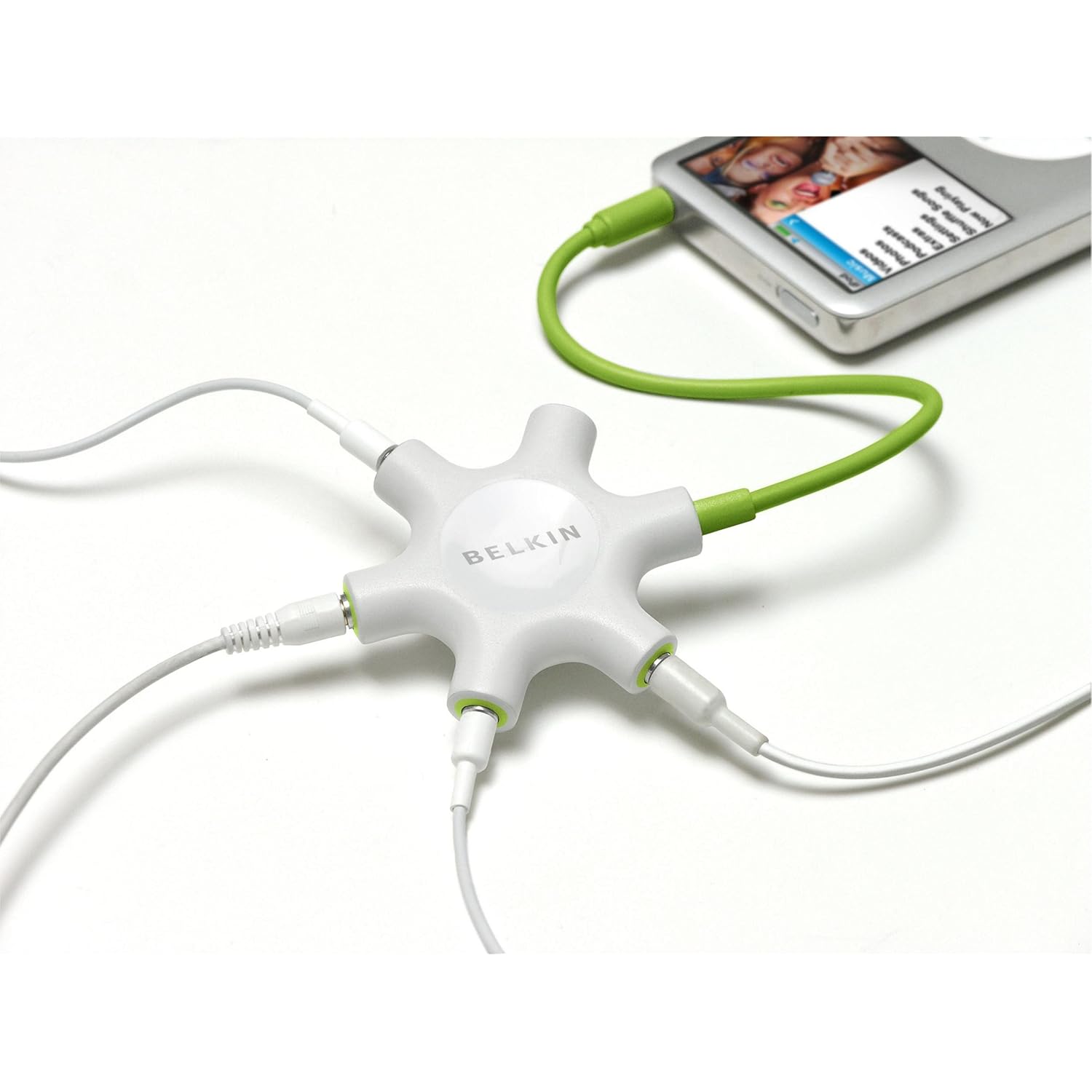 |
| Belkin Rockstar Multi-Headphone Splitter |
I highly recommend this little gadget. - It produces a clear, quality sound and with no loss of volume. It's so easy to store and use. Just plug it into a computer, ipad or iphone and it allows a group of kids to work on the same computer or ipad activity at once.
I also use it to work with students on Lexia. I can hear what they hear and work out where their confusion lies.
Plus, of course, add an ipod and it becomes your own little listening post. Great for senior classrooms where you may want to utilize read and listen activities but don't have the space or resources to carry a full size listen post in every classroom.
This little gadget also has the ability to mix sounds from two or possibly three inputs. That's not something I've actually tried yet but the budding DJs in your class may like to have a go. Mix two ipods and feed the sound into garage band or other sound mixing software on a computer or ipad and come out with some really neat 'mash-ups'. Senior kids could have some real fun with that.
Better yet, it's actually quite cheep.
You can buy them online from Amazon UK (may require a UK delivery address) for about $13 per unit or from Amazon USA (ships internationally) for $15. You can access them from Harvey Norman in New Zealand but I was quoted around $30 so it's better to go online.
Enjoy.
Thursday, February 16, 2012
Organising my games
Today I finished something I began over the holidays. I organised my games.
I've been reading a wonderful blog called Clutter-free Classroom (thanks Jodi) which has kept me motivated in my quest to de-clutter my classroom.

I launched the attack on my classroom over the Christmas period this year because I was determined not to go through another year without knowing what half the boxes in my office contained. That's a bi-product of taking over an existing classroom. The classroom wasn't really disorganized I just didn't know what was in all the boxes and stacks, something I'm sure most of you could related to at some point in your career. So I set out to find out, throw out and tidy up, in order to find a happy zen like state which worked for me.
I found Jodi's blog around about the same time as I declared war and have enjoyed the little bits of advice and ideas she's shared. Plus, it's just been nice to know there are others out there fighting the same war on clutter. It's always nice to know you're not alone. I just wish I'd kept photos of the massive discard piles. I think she'd be proud of me.
I'm not there yet, but I'm well on the way and today I finished tidying up my games. I thought some of these ideas might be helpful to others.
 This year I am all about explicit WALTs (We Are Learning To). So I've gone through my games and put WALTs on them. I want the kids to take more responsibility for their learning and part of that is knowing WHY they are doing something. I think that knowing that there is a learning purpose will motivate them to play the games I put out rather than some easier ones they make up.
 In terms of reading, this is particularly important as my kids have an aversion to reading instructions. They would rather use dominoes for building purposes, than to read the simple instructions I give them for the real game (although that's a Maths game, but there are crossovers in all games.)
Anyway, we are working on this, and I have a couple of sneaky ideas up my sleeve. I'll let you know how they go. One such ploy is to have the principal to wander through occasionally and ask them to show her what they are doing, how to do it and to tell her what they are learning through the activity they are doing. It makes them accountable and maintains my focus on making learning intentions explicit.

As well as the WALT (which I put on the bag and the game boards for maximum visability), I also include the contents of the bag and the number of players (if I want to restrict numbers). (See the last image for an example.)
.jpg)
Above is another WALT example and a cool way to prolong the life of your average plastic 'Guess Who?' game. The plastic holders were quite a mess (and bulky too) so I ditched them and got a friend to laminated the remaining small cards onto a coloured card background. (Thanks Mike.) When I've got some time, I plan to laminate the bigger yellow game cards too, to extend their life a bit more as well. I then gave the kids tokens to cover the faces that didn't fit the information they had about their opponent's person (the yellow cards).
Meanwhile, on the management side, in a recent Clutter-free Classroom blog post, Jodi shared Storage Tip #8 Ditch the Packaging. I've often used plastic bags when games have outlived their boxes, but it hadn't occurred to me to use them to save space as well. I like pretty boxes but I will definitely be ditching them when I need more space.
Here is my little tip of the week though. I learnt this from someone while I was training.
To extend the lifespan of zip-lock bags. Use thick tape to give extra strength at the seams then snip the corners off the bag. Once strengthened the bag is less like to rip (even at the corners) and the holes make it easy to get the air out of the bags once they are closed meaning less space wasted by balloon bags full of tiny resources and lots of air! I do this to all my bags. Another option is to hole punch the bag, just make sure you punch away from the edges of the bag and/or on a strengthened section.
.jpg)
Thursday, February 9, 2012
To Swim or Not To Swim, That is the Question
Another summer has rolled around and with it comes term one swimming.
My question this time was, do I swim with the kids or not?
I printed up the notices, requested parent help and secured the support of the bus drivers for lifeguard duty. Then I began eyeing the pool suspiciously. It's one thing to throw 22 complaining children into a cold pool and watch gleefully from the sidelines on a cold day, but to join them? Bravely, I decided I would.
Ok, so I may have left out the part about living in the sunshine capital of New Zealand, that the water wasn't actually cold at all and that it was a lovely warm day as well.
My real qualms were over the appropriateness of getting in the pool with my students. I know some schools say strictly, no teachers in the pool. I know for some schools it's a health and safety thing as you can't keep a proper eye on all the children if you are in the thick of it. But as I just rewrote the PE curriculum document I guess that call fell to me and I decided to go with the guidelines requiring an adult to supervise from above the pool (ie, not in it) at all times.
In terms of pedagogy and best practice, I look back to when I've taken classes to council pools for lessons with trained swimming instructors. It is only with the most able swimmers that the instructors are on the edge. The rest of the time the tutors are right in the water with the kids.
As teachers, we demonstrate reading, writing and maths as a matter of course. It seems a little strange that we don't do the same in swimming.
I think I'm more squeamish about dress codes actually. You spend so much time searching shops for nice looking outfits with high necklines and long hemlines, that it seems completely unnatural to jump into togs and dive into a pool with the students. But that's probably just me.
Board shorts and an extra singlet /swim top went someway towards settling those apprehensions, and confirming access to a separate changing room surmounted the final blockade.
So, on Tuesday this week, no excuses were left between me and that pool.
It was definitely rather entertaining to hear the excited yelps of "Miss Aldridge! Are you getting in? Hey! Guys! Miss Aldridge is getting in!" erupting around the pool. In fact, for a while there, we even had a small audience of students from the school whose pool we were borrowing. Funny.
It was also rather amusing when a lunchtime duty teacher remarked to the bus driver (to be found, at the time, relaxing in the shade at the water's edge) "Wow, you have them so well controlled, you barely have to do anything! I wish I could sit back and relax when I was teaching swimming." To which the bus driver gained great entertainment from pointing out that the teacher was actually IN the pool and he was "just the driver" (his words not mine). She looked quite surprised when one of the pigtailed "students" (me) turned round and waved at her. I have, however, since noticed that the instructors from the school before us in the pool today, were also swimming with their students. So perhaps it's more common than I realise.
Being able to demonstrate to the children in the water was so much easier. I think it takes a lot of spacial awareness to be able to turn something demonstrated vertically into an action they complete horizontally. It was much easier to demonstrate skills exactly as I wanted them to apply it. They picked it up so much quicker. Even John my Wednesday bus driver, who drove and supervised for us last year, noticed they were picking things up faster.
Being in the pool also allowed me to help kids physically. For example, one child was struggling to keep their arms straight because their kicking wasn't strong enough to maintain movement. I was able to pull him across the pool while he concentrated on breathing and arm strokes. I was able to help another student float his arms while he focused on his body and kicking.
I think the greatest benefit was with the non-swimmers and their increased confidence having me close by. Today I had a child, who previously would start crying almost at the sight of the water (and did so when I assessed them from outside the pool on day one), grinning, playing and gliding across the pool on her front, with her face in the water for prolonged periods of time. It doesn't sound like much but that was more in 2 sessions, than I achieved with her last time in the entire 5 week swimming program.
My question this time was, do I swim with the kids or not?
I printed up the notices, requested parent help and secured the support of the bus drivers for lifeguard duty. Then I began eyeing the pool suspiciously. It's one thing to throw 22 complaining children into a cold pool and watch gleefully from the sidelines on a cold day, but to join them? Bravely, I decided I would.
Ok, so I may have left out the part about living in the sunshine capital of New Zealand, that the water wasn't actually cold at all and that it was a lovely warm day as well.
My real qualms were over the appropriateness of getting in the pool with my students. I know some schools say strictly, no teachers in the pool. I know for some schools it's a health and safety thing as you can't keep a proper eye on all the children if you are in the thick of it. But as I just rewrote the PE curriculum document I guess that call fell to me and I decided to go with the guidelines requiring an adult to supervise from above the pool (ie, not in it) at all times.
In terms of pedagogy and best practice, I look back to when I've taken classes to council pools for lessons with trained swimming instructors. It is only with the most able swimmers that the instructors are on the edge. The rest of the time the tutors are right in the water with the kids.
As teachers, we demonstrate reading, writing and maths as a matter of course. It seems a little strange that we don't do the same in swimming.
I think I'm more squeamish about dress codes actually. You spend so much time searching shops for nice looking outfits with high necklines and long hemlines, that it seems completely unnatural to jump into togs and dive into a pool with the students. But that's probably just me.
Board shorts and an extra singlet /swim top went someway towards settling those apprehensions, and confirming access to a separate changing room surmounted the final blockade.
So, on Tuesday this week, no excuses were left between me and that pool.
It was definitely rather entertaining to hear the excited yelps of "Miss Aldridge! Are you getting in? Hey! Guys! Miss Aldridge is getting in!" erupting around the pool. In fact, for a while there, we even had a small audience of students from the school whose pool we were borrowing. Funny.
It was also rather amusing when a lunchtime duty teacher remarked to the bus driver (to be found, at the time, relaxing in the shade at the water's edge) "Wow, you have them so well controlled, you barely have to do anything! I wish I could sit back and relax when I was teaching swimming." To which the bus driver gained great entertainment from pointing out that the teacher was actually IN the pool and he was "just the driver" (his words not mine). She looked quite surprised when one of the pigtailed "students" (me) turned round and waved at her. I have, however, since noticed that the instructors from the school before us in the pool today, were also swimming with their students. So perhaps it's more common than I realise.
And how did it work for teaching? Fabulously!
Being able to demonstrate to the children in the water was so much easier. I think it takes a lot of spacial awareness to be able to turn something demonstrated vertically into an action they complete horizontally. It was much easier to demonstrate skills exactly as I wanted them to apply it. They picked it up so much quicker. Even John my Wednesday bus driver, who drove and supervised for us last year, noticed they were picking things up faster.
Being in the pool also allowed me to help kids physically. For example, one child was struggling to keep their arms straight because their kicking wasn't strong enough to maintain movement. I was able to pull him across the pool while he concentrated on breathing and arm strokes. I was able to help another student float his arms while he focused on his body and kicking.
I think the greatest benefit was with the non-swimmers and their increased confidence having me close by. Today I had a child, who previously would start crying almost at the sight of the water (and did so when I assessed them from outside the pool on day one), grinning, playing and gliding across the pool on her front, with her face in the water for prolonged periods of time. It doesn't sound like much but that was more in 2 sessions, than I achieved with her last time in the entire 5 week swimming program.
So in the end, the answer to the question? To swim or not to swim (with the kids)?
The answer would have to be a resounding
Swim WITH them!!
Monday, February 6, 2012
Phonics Flash Cards
On a side note (from the last post), and in honor of my Mum's birthday, I thought another post about the things my Mum has taught me was in order.
Mum tells me that she didn't try to teach my sister and I to read before school because she didn't want us to be bored. However, my sister began "reading" books at 4 months so clearly Mum's plan was not going to hold much weight with her. A strong memory of my sister and her reading skills is the annoying photographic memory she had/has. Staying in a cabin with my family during the christmas holidays, we would be in bunks on opposite sides of the room. I would ask Mum what a word in my book was and my clever sister would ask the sentence and proceed to tell me the not only the word I was struggling with but often the rest of the paragraph to boot! Grrr. Stupid intelligent sister.
I was never as fast a reader as my sister or my clever cousin, both of whom can devour a large book in one sitting, but I did have very good understanding. I probably didn't realise that until my reading tutor at Grad School (New Zealand Graduate School of Education) pointed out to me all the comprehension strategies I was using, both as the cause of, and as a remedy to, my slow reading speed. As a result, comprehension strategies are central to my reading tuition. I might blog about my programme at some stage.
Looking back, I don't really remember learning to read at school, but I do remember Mum teaching me phonics. It's a strategy I myself use daily now, and one I think was out of vogue when I in school.
I still remember Mum's little cardboard flashcards in the cupboard with the games and jigsaws. "ow as in cow" "ough as in tough". I jazzed those up last year and used them for a struggling student in my class. He went on to improve from reading level orange to level 2 texts (with support), over two years of progress in one year. Unsurprisingly he took out our school's 'Most Improved' trophy for the year and the movement definitely started when I introduced the cards. Go Mum!
.JPG)
I was so impressed with how well they worked. I was going to share the template but unfortunately my back-up disk failed. They are easy enough to make though. I just printed up squares and stuck them on to coloured card. That served two purposes; it stopped the cards being see through and it removed the hassle of making them match up perfectly with double sided printing.
I just made up cards for letter sound combinations he struggled with. I picked images that helped him recognise the sound and clue word. It worked great because if he couldn't remember the sound he remembered the picture and the word and that gave him the sound. Sometimes I had to get a little creative in my images. e.g. for "ould" I used the cover of "The Little Engine That Could" and I read him the story to help him remember and recognise the image.
He learnt them really quickly. Try it with your kids. I'd love to know how they respond.
Anyway, it just goes to show. Your Mum really is your first and best teacher. Thanks Mum.
Happy Birthday!
Mum tells me that she didn't try to teach my sister and I to read before school because she didn't want us to be bored. However, my sister began "reading" books at 4 months so clearly Mum's plan was not going to hold much weight with her. A strong memory of my sister and her reading skills is the annoying photographic memory she had/has. Staying in a cabin with my family during the christmas holidays, we would be in bunks on opposite sides of the room. I would ask Mum what a word in my book was and my clever sister would ask the sentence and proceed to tell me the not only the word I was struggling with but often the rest of the paragraph to boot! Grrr. Stupid intelligent sister.
I was never as fast a reader as my sister or my clever cousin, both of whom can devour a large book in one sitting, but I did have very good understanding. I probably didn't realise that until my reading tutor at Grad School (New Zealand Graduate School of Education) pointed out to me all the comprehension strategies I was using, both as the cause of, and as a remedy to, my slow reading speed. As a result, comprehension strategies are central to my reading tuition. I might blog about my programme at some stage.
Looking back, I don't really remember learning to read at school, but I do remember Mum teaching me phonics. It's a strategy I myself use daily now, and one I think was out of vogue when I in school.
I still remember Mum's little cardboard flashcards in the cupboard with the games and jigsaws. "ow as in cow" "ough as in tough". I jazzed those up last year and used them for a struggling student in my class. He went on to improve from reading level orange to level 2 texts (with support), over two years of progress in one year. Unsurprisingly he took out our school's 'Most Improved' trophy for the year and the movement definitely started when I introduced the cards. Go Mum!
.JPG)
I was so impressed with how well they worked. I was going to share the template but unfortunately my back-up disk failed. They are easy enough to make though. I just printed up squares and stuck them on to coloured card. That served two purposes; it stopped the cards being see through and it removed the hassle of making them match up perfectly with double sided printing.
I just made up cards for letter sound combinations he struggled with. I picked images that helped him recognise the sound and clue word. It worked great because if he couldn't remember the sound he remembered the picture and the word and that gave him the sound. Sometimes I had to get a little creative in my images. e.g. for "ould" I used the cover of "The Little Engine That Could" and I read him the story to help him remember and recognise the image.
He learnt them really quickly. Try it with your kids. I'd love to know how they respond.
Anyway, it just goes to show. Your Mum really is your first and best teacher. Thanks Mum.
Happy Birthday!

Copyright Information
IMAGES
© Footsteps & Post-it Notes 2011.
Images may be used to link to my page but please seek permission to use any images for other purposes as I, myself, have limited permissions on some images.
OTHER WORKS

This work is licensed under a Creative Commons Attribution-NonCommercial-NoDerivs 3.0 New Zealand License. This licence allows others to download works and share them with others as long as you mention me and link back to me (where possible), but please don't change my resources or use them commercially without my permission.
Thank you for your support.
© Footsteps & Post-it Notes 2011.
Images may be used to link to my page but please seek permission to use any images for other purposes as I, myself, have limited permissions on some images.
OTHER WORKS
This work is licensed under a Creative Commons Attribution-NonCommercial-NoDerivs 3.0 New Zealand License. This licence allows others to download works and share them with others as long as you mention me and link back to me (where possible), but please don't change my resources or use them commercially without my permission.
Thank you for your support.